---
title: "Contentstack Delivery JS SDK"
description: "Documentation for Javascript Delivery SDK"
url: "https://www.contentstack.com/docs/developers/sdks/content-delivery-sdk/javascript-browser/reference"
product: "Contentstack"
doc_type: "guide"
audience:
- developers
- admins
version: "current"
last_updated: "2025-09-15"
---
# Contentstack Delivery JS SDK
## JavaScript Delivery SDK
**Note**: We recommend using the [TypeScript Delivery SDK](/docs/developers/sdks/content-delivery-sdk/typescript) as a preferred option over the JavaScript Delivery SDK for optimal performance and enhanced functionality in your project. Learn to seamlessly [migrate from JavaScript to TypeScript](/docs/developers/sdks/content-delivery-sdk/typescript/migrate-from-javascript-to-typescript/).
Contentstack is a headless CMS with an API-first approach. It is a CMS that developers can use to build powerful cross-platform applications in their favorite languages. Build your application frontend, and Contentstack will take care of the rest. [Read More](https://www.contentstack.com/).
Contentstack provides JavaScript Delivery SDK to build application on top of JavaScript. Given below is the detailed guide and helpful resources to get started with our JavaScript Delivery SDK.
The JavaScript Delivery SDK can also be used to create Node.js and React native applications.
## Prerequisite
You need [Node.js version 22 or later](https://nodejs.org/en) or later installed to use the Contentstack JavaScript Delivery SDK.
## Setup and Installation
## For JavaScript (Browser)
For browsers, we recommend to download the library via npm or yarn to ensure 100% availability.
If you'd like to use a standalone built file you can use the following script tag or download it from [jsDelivr](https://www.jsdelivr.com/package/npm/contentstack), under the \`dist\` directory:
You can also specify a specific version number.
To initialize the SDK, you will need to specify the API Key, Delivery Token, and Environment Name of your stack.
const Stack = Contentstack.Stack({"api\_key":"api\_key","delivery\_token":"delivery\_token","environment":"environment"});
To initialize the SDK for the Europe, Azure NA, Azure EU region, GCP NA, GCP EU, or AWS AU refer to the code below:
FOR EU
const Stack = Contentstack.Stack({"api\_key":"api\_key","delivery\_token":"delivery\_token","environment":"environment","region":Contentstack.Region.EU});
FOR AZURE\_EU
const Stack = Contentstack.Stack({"api\_key":"api\_key","delivery\_token":"delivery\_token","environment":"environment","region":Contentstack.Region.AZURE\_EU});
FOR AZURE\_NA
const Stack = Contentstack.Stack({"api\_key":"api\_key","delivery\_token":"delivery\_token","environment":"environment","region":Contentstack.Region.AZURE\_NA});
FOR GCP\_NA
const Stack = Contentstack.Stack({"api\_key":"api\_key","delivery\_token":"delivery\_token","environment":"environment","region":Contentstack.Region.GCP\_NA});
FOR GCP\_EU
const Stack = Contentstack.Stack({"api\_key":"api\_key","delivery\_token":"delivery\_token","environment":"environment","region":Contentstack.Region.GCP\_EU});
FOR AWS\_AU
const Stack = Contentstack.Stack({"api\_key":"api\_key","delivery\_token":"delivery\_token","environment":"environment","region":Contentstack.Region.AWS\_AU});
To initialize the SDK with Early Access Header, refer to the code below:
const Stack = Contentstack.Stack({
'api\_key':'api\_key',
'delivery\_token':'delivery\_token',
'environment':'environment\_name',
'early\_access': \['early\_access\_1', 'early\_access\_2'\]
});
## For Node.js
Node.js uses the Javascript SDK to create apps. To use the JavaScript Delivery SDK, install it via npm:
npm i contentstack
To import the SDK in your project, use the following command:
import Contentstack from 'contentstack';
To initialize the SDK, you will need to specify the API Key, Delivery Token, and Environment Name of your stack.
const Stack = Contentstack.Stack({ "api\_key": "api\_key", "delivery\_token": "delivery\_token", "environment": "environment");
To initialize the SDK for the Europe, Azure NA, Azure EU, GCP NA, or GCP EU region, refer to the code below:
FOR EU
const Stack = Contentstack.Stack({"api\_key":"api\_key","delivery\_token":"delivery\_token","environment":"environment","region":Contentstack.Region.EU});
FOR AZURE\_EU
const Stack = Contentstack.Stack({"api\_key":"api\_key","delivery\_token":"delivery\_token","environment":"environment","region":Contentstack.Region.AZURE\_EU});
FOR AZURE\_NA
const Stack = Contentstack.Stack({"api\_key":"api\_key","delivery\_token":"delivery\_token","environment": "environment","region":Contentstack.Region.AZURE\_NA });
FOR GCP\_NA
const Stack = Contentstack.Stack({"api\_key":"api\_key","delivery\_token":"delivery\_token","environment":"environment","region":Contentstack.Region.GCP\_NA});
FOR GCP\_EU
const Stack = Contentstack.Stack({"api\_key":"api\_key","delivery\_token":"delivery\_token","environment":"environment","region":Contentstack.Region.GCP\_EU});
FOR AU
const Stack = Contentstack.Stack({"api\_key":"api\_key","delivery\_token":"delivery\_token","environment":"environment","region":Contentstack.Region.AU});
## For React Native
React Native uses the Javascript SDK to create apps. To use the JavaScript Delivery SDK, install ist via npm:
npm i contentstack
To import the SDK in your project, use the following command:
import Contentstack from 'contentstack/react-native'
To initialize the SDK, you will need to specify the API Key, Delivery Token, and Environment Name of your stack.
const Stack = Contentstack.Stack({ "api\_key": "api\_key", "delivery\_token": "delivery\_token", "environment": "environment" });
To initialize the SDK for the Europe, Azure NA, Azure EU, GCP NA, or GCP EU region, refer to the code below:
FOR EU
const Stack = Contentstack.Stack({"api\_key":"api\_key","delivery\_token":"delivery\_token","environment":"environment","region":Contentstack.Region.EU});
FOR AZURE\_EU
const Stack = Contentstack.Stack({"api\_key":"api\_key","delivery\_token":"delivery\_token","environment":"environment","region":Contentstack.Region.AZURE\_EU});
FOR AZURE\_NA
const Stack = Contentstack.Stack({"api\_key":"api\_key","delivery\_token":"delivery\_token","environment": "environment", "region": Contentstack.Region.AZURE\_NA});
FOR GCP\_NA
const Stack = Contentstack.Stack({"api\_key":"api\_key","delivery\_token":"delivery\_token","environment":"environment","region":Contentstack.Region.GCP\_NA});
FOR GCP\_EU
const Stack = Contentstack.Stack({"api\_key":"api\_key","delivery\_token":"delivery\_token","environment":"environment","region":Contentstack.Region.GCP\_EU});
const Stack =
Contentstack.Stack({"api\_key":"api\_key","delivery\_token":"delivery\_token","environment":"environment","region":Contentstack.Region.AU});
## Quickstart in 5 mins
## Initializing your SDK
You will need to specify the API key, Delivery token, and Environment Name of your stack to initialize the SDK:
const Stack = Contentstack.Stack({ "api\_key": "api\_key", "delivery\_token": "delivery\_token", "environment": "environment" });
Once you have initialized the SDK, you can start getting content in your app.
## Querying content from your stack
To get a single entry, you need to specify the content type as well as the ID of the entry.
const Stack = Contentstack.Stack({ "api\_key": "api\_key", "delivery\_token": "delivery\_token", "environment": "environment" });
const entry = Stack.ContentType('blog').Entry("entry\_uid");
const result = await entry.toJSON().fetch();
**Note**: We have a method on query for a specific language. For example, consider the following query:
Stack.ContentType('content\_type\_uid').Query().language('fr-fr').toJSON().find();
It will provide all entries of a content type published on the French locale.
To retrieve multiple entries of a content type, you need to specify the content type uid. You can also specify search parameters to filter results.
const Stack = Contentstack.Stack({"api\_key": "api\_key", "delivery\_token": "delivery\_token", "environment": "environment" });
const Query = Stack.ContentType('blog').Query();
Query.where("title", "welcome")
.includeSchema()
.includeCount()
.toJSON()
.find()
.then((result) => {
})
.catch((error))=> {
});
**Note:**
* Currently, the JavaScript SDK does not support multiple content types referencing in a single query. For more information on how to query entries and assets, refer the [Queries](https://www.contentstack.com/docs/developers/apis/content-delivery-api/#queries) section of our Content Delivery API documentation.
* By default, the limit for response details per request is **100**, with the maximum limit set at **250**.
## Paginating Responses
In a single instance, the Get Multiple Entries query will retrieve only the first 100 items of the specified content type. You can paginate and retrieve the rest of the items in batches using the **skip** and **limit** parameters in subsequent requests.
const Stack = Contentstack.Stack({ "api\_key": "api\_key", "delivery\_token": "delivery\_token", "environment": "environment" });
let blogQuery = Stack.ContentType('example').Query();
blogQuery.skip(20).limit(20).find()
.then((result) => {
}).catch((error))=> {
});
## Querying Assets from your stack
To get a single asset, you need to specify the UID of the asset.
const Stack = Contentstack.Stack({ "api\_key": "api\_key", "delivery\_token": "delivery\_token", "environment": "environment" });
const Asset = Stack.Asset("asset\_uid");
Asset.fetch()
.then((result) => {
}).catch((error))=> {
});
To retrieve multiple assets. You can also specify search parameters to filter results.
const Stack = Contentstack.Stack({ "api\_key": "api\_key", "delivery\_token": "delivery\_token", "environment": "environment" });
const Query = Stack.Asset().Query();
Query
.limit(20)
.toJSON()
.find()
.then(function success(result) {
}, function error(err) {
});
## Cache Policies
You can set a cache policy on a stack and/or query object.
##### **Setting a cache policy on a stack**
This option allows you to globalize a cache policy. This means the cache policy you set will be applied to all the query objects of the stack.
//Setting a cache policy on a stack
Stack.setCachePolicy(Contentstack.CachePolicy.NETWORK\_ELSE\_CACHE)
##### **Setting a cache policy on a query object**
This option allows you to set/override a cache policy on a specific query object.
// setting a cache policy on a queryobject
Query.setCachePolicy(Contentstack.CachePolicy.CACHE\_THEN\_NETWORK)
## Contentstack
Creates an instance of \`Contentstack\`.
## Stack
Initialize an instance of ‘Stack’
Stack API key
Stack Delivery token.
Stack Environment name.
DB region for Stack. You can choose from six regions namely, NA, EU, Azure NA, Azure EU, GCP NA, GCP EU, and AWS AU.
Name of the branch you want to fetch data from
Live preview configuration.
Optional, to enable debug logs set to true.
A log handler function to process given log messages & errors.
Set timeout for the request.
The number of retries before failure.
The number of ms to use for operation retries.
A function to determine if the error can be retried.
The base number of milliseconds to use in the exponential backoff for operation retries.
A custom function that accepts a retry count and error and returns the amount of time to delay in milliseconds.
## FetchOptions Retry Parameters
This section explains how the Contentstack JavaScript SDK uses the fetchOptions parameter to retry failed requests based on configurable rules.
This improves reliability by retrying failed requests caused by network issues, timeouts, or temporary server errors.
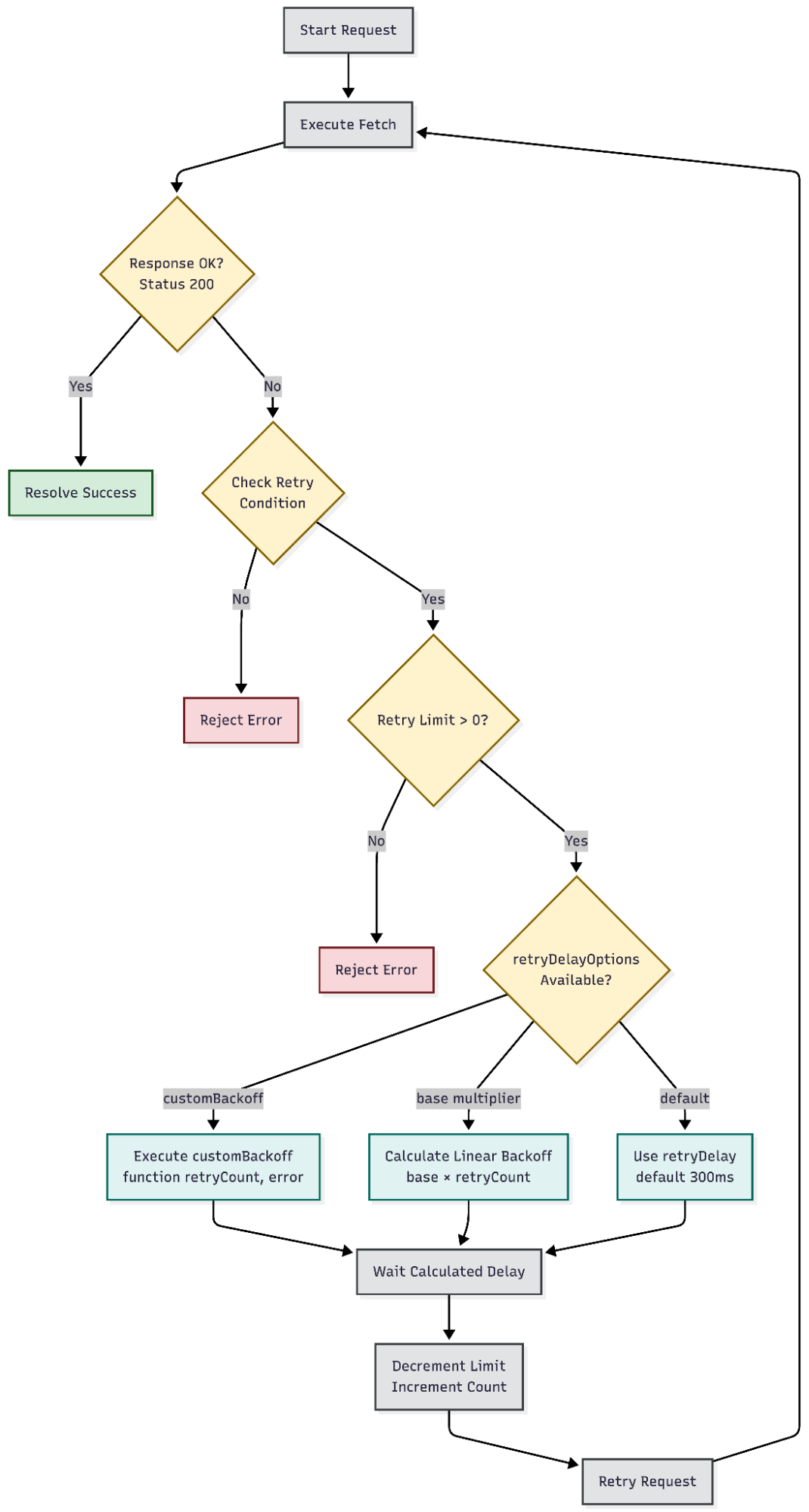
**Retry Logic Flow:**
1. **Initial Request:** The SDK sends the HTTP request.
2. **Evaluate Response:** If status is 200 and response.ok is true, resolve with data.
3. **Check Retry Conditions:** If the request fails, check if the error meets retry conditions.
4. **Decide to Retry:** Evaluate retryCondition function (default: status 408, 429).
5. **Check Retry Limit:** Verify if retry attempts remain (retryLimit > 0).
6. **Calculate Retry Delay:** Calculate wait time using one of the following methods:
1. retryDelay (fixed delay)
2. retryDelayOptions.base \* retryCount (linear backoff)
3. retryDelayOptions.customBackoff (retryCount, error) (custom logic)
7. **Wait Before Retry:** Pause execution for the calculated delay.
8. **Attempt Retry:** Recursively call fetchRetry with a decremented limit.
9. **Exit with Final Error:** If all retries are exhausted, reject with final error.
**Code Snippet:**
const stack = Contentstack.Stack({
api\_key: 'your\_api\_key',
delivery\_token: 'your\_delivery\_token',
environment: 'your\_environment',
fetchOptions: {
retryLimit: 5, // Number of retries before failing the request.
retryDelay: 100, // Fallback delay (in ms) if retryDelayOptions are not configured.
// A custom function to determine whether the error qualifies for a retry.
retryCondition: (error) => {
// Retry on network errors, timeouts, rate limits, and server errors.
return \[408, 429, 500, 502, 503, 504\].includes(error.status);
},
retryDelayOptions: {
// Base multiplier for exponential backoff. The delay becomes base \* retryCount.
base: 1000, // 1st retry: 1000ms, 2nd retry: 2000ms, 3rd retry: 3000ms, etc.
// Use either base or customBackoff.
// Defines a custom function that calculates delay for each retry attempt.
customBackoff: (retryCount, error) => {
// Exponential backoff with jitter.
const baseDelay = Math.pow(2, retryCount) \* 1000;
const jitter = Math.random() \* 1000;
return baseDelay + jitter;
}
}
}
});
## Plugins
## Contentstack
CachePolicy contains different cache policies constants.
CachePolicy contains different cache policies constants.
## Stack
Initialize an instance of ‘Stack’
## setProtocol
Sets the protocol for the host
Web Protocol for request (http or https)
## setHost
Sets the host of the API server
Sets the host of the API server
## setPort
Sets the port of the host
Port number of the endpoint
## setCachePolicy
Allows you to set cache policies
## setCacheProvider
Sets the Cache Provider's get and set methods used in SDK to cache data.
## getCacheProvider
Returns the currently set object of 'CacheProvider'
## Assets
Retrieves all assets of a stack by default. To retrieve a single asset, specify its UID.
UID of the asset
## ContentType
Set the content type of which you want to retrieve the entries
UID of the existing content type
## getContentTypes
This method returns comprehensive information of all the content types of a particular stack in your account.
## getLastActivities
The getLastActivities retrieves all the ContentTypes whose last activity updated.
## Taxonomies
Set the base URL to the taxonomies endpoint.
## Query
An initializer is responsible for creating Query object.Provides support for all search queries
## imageTransform
Performs transformations on images of mentioned url based on transformation parameters
Image url on which transformations need to be applied.
Object with transformation parameters
## sync
Syncs your Contentstack data with your app and ensures that the data is always up-to-date by providing delta updates
initializing sync
initializing sync with entries of a specific locale
initializing sync with entries of a specific content type
Use the type parameter to get a specific type of content.Supports 'asset\_published', 'entry\_published', 'asset\_unpublished', 'entry\_unpublished', 'asset\_deleted', 'entry\_deleted', 'content\_type\_deleted'
Fetching the next batch of entries using pagination token
Performing subsequent sync after initial sync
## Stack
Stack API Key.
Stack Delivery token.
Stack Environment name.
Stack API Key.
Stack Delivery token.
Stack Environment name.
## Assets
Creates an instance of \`Assets\`.
Retrieves all assets of a stack by default. To retrieve a single asset, specify its UID.
## addParam
URL Parameter key.
Value corresponding to the param.
## toJSON
Converts your response into plain JavasScript object<.p>
## fetch
Fetches a particular asset based on the provided asset UID.
## where
The where() method retrieves the assets from the stack using any other field UID of the assets.
Field UID of the Asset
Value of the Asset
## Assets
UID of asset you want to retrieve
UID of asset you want to retrieve
## Entry
An initializer is responsible for creating Entry object.
## Entry
uid of the entry
## language
Sets the language code of which you want to retrieve data.
language code. e.g. 'en-us', 'ja-jp', etc.
## addParam
Includes query parameters in your queries.
URL parameter key.
Value corresponding to the parameter.
## addQuery
Adds query to Entry object
Key of the query
Value of the query
## only
Displays values of only the specified fields of entries or assets in the response
Field UID of content type
## except
Displays all data of an entries or assets excluding the data of the specified fields.
Field UID of content type
## includeReference
Fetches the entire content of referenced entry.
Field UID of content type
## includeReferenceContentTypeUID
This method also includes the content type UIDs of the referenced entries returned in the response.
## includeEmbeddedItems
Include Embedded Objects (Entries and Assets) along with entry/entries details.
## includeContentType
Include the details of the content type along with the entry/entries details.
## includeBranch
Include the Branch for publish content.
## includeFallback
Include the fallback locale publish content, if specified locale content is not publish.
## fetch
Fetches a particular entry based on the provided entry UID.
Fetch options to fetch particular entry
## Variants
Variants are different versions of content designed to meet specific needs or target audiences. This feature allows content editors to create multiple variations of a single entry, each customized for a particular variant group or purpose.
When Personalize creates a variant in the CMS, it assigns a "Variant Alias" to identify that specific variant. When fetching entry variants using the Delivery API, you can pass variant aliases in place of variant UIDs in the x-cs-variant-uid header.
Uid of the entry
## Taxonomy
Taxonomy helps you categorize pieces of content within your stack to facilitate easy navigation and retrieval of information.
**Note**: All methods in the Query section are applicable for taxonomy-based filtering as well.
## equalAndBelow
The equalAndBelow method retrieves all entries for a specific taxonomy that match a specific term and all its descendant terms, requiring only the target term.
**Note**: This query is applicable for the stack.Taxonomies() and stack.ContentType('uid').Query() methods.
UID of the taxonomy field, specified as "taxonomies."
UID of the term to match or compare
Depth level till which terms will be matched
## below
The below method retrieves all entries for a specific taxonomy that match all of their descendant terms by specifying only the target term and a specific level.
**Note**: If you don't specify the level, the default behavior is to retrieve terms up to level **10**.
UID of the taxonomy field, specified as "taxonomies."
UID of the term to match or compare
Depth level till which terms will be matched
## equalAndAbove
The equalAndAbove method retrieves all entries for a specific taxonomy that match a specific term and all its ancestor terms, requiring only the target term and a specified level.
**Note**: If you don't specify the level, the default behavior is to retrieve terms up to level **10**.
UID of the taxonomy field, specified as "taxonomies."
UID of the term to match or compare
Depth level till which terms will be matched
## above
The above method retrieves all entries for a specific taxonomy that match only the parent term(s) of a specified target term, excluding the target term itself and a specified level.
**Note**: If you don't specify the level, the default behavior is to retrieve terms up to level **10**.
UID of the taxonomy field, specified as "taxonomies."
UID of the term to match or compare
Depth level till which terms will be matched
## Query
An initializer is responsible for creating Query object. Provides support for all search queries
## addParam
Includes query parameters in your queries.
URL parameter key
Value corresponding to the param
## where
Retrieve entries in which a specific field satisfies the value provided.
UID of the field
Value used to match or compare
## notEqualTo
Retrieves entries in which the value for a field does not match the provided value.
UID of the field
Value used to match or compare
## containedIn
Retrieve entries in which the value of a field matches with any of the provided array of values
UID of the field
Array of values that are to be used to match or compare
## notContainedIn
Retrieve entries in which the value of a field does not match with any of the provided array of values.
UID of the field
Array of values that are to be used to match or compare
## and
Retrieve entries that satisfy all the provided conditions.
array of Query objects or raw queries
## or
Retrieves entries that satisfy at least one of the given conditions
array of Query objects or raw queries
## lessThan
Retrieves entries in which the value of a field is lesser than the provided value
UID of the field
Value used to match or compare
## lessThanOrEqualTo
Retrieves entries in which the value of a field is lesser than or equal to the provided value.
UID of the field
Value used to match or compare
## greaterThan
Retrieves entries in which the value for a field is greater than the provided value.
UID of the field
Value used to match or compare
## greaterThanOrEqualTo
Retrieves entries in which the value for a field is greater than or equal to the provided value.
UID of the field
Value used to match or compare
## limit
Returns a specific number of entries based on the set limit
maximum number of entries to be returned
## skip
Skips at specific number of entries.
number of entries to be skipped
## ascending
Sort fetched entries in the ascending order with respect to a specific field.
field uid based on which the ordering will be done
## descending
Sort fetched entries in the descending order with respect to a specific field
field uid based on which the ordering will be done
## exists
Retrieve entries if value of the field, mentioned in the condition, exists.
UID of the field
## notExists
Retrieve entries if value of the field, mentioned in the condition, does not exists.
UID of the field
## only
Displays values of only the specified fields of entries or assets in the response
Field UID of content type
## except
Displays all data of an entries or assets excluding the data of the specified fields.
Field UID of content type
## regex
Retrieve entries that match the provided regular expressions
uid of the field
value used to match or compare
match or compare value in entry
## tags
Retrieves entries based on the provided tags.
array of tags
## includeReference
Fetches the entire content of referenced entry.
Field UID of content type
## referenceIn
Retrieve entries based on raw queries.
Reference field Uid
RAW (JSON) queries
## referenceNotIn
Retrieve entries based on raw queries.
Reference field Uid
RAW (JSON) queries
## includeReferenceContentTypeUID
This method also includes the content type UIDs of the referenced entries returned in the response.
## includeCount
Includes the total number of entries returned in the response.
## includeContentType
Include the details of the content type along with the entry/entries details.
## includeBranch
Include the Branch for publish content.
## includeEmbeddedItems
Include Embedded Objects (Entries and Assets) along with entry/entries details.
## includeFallback
Include the fallback locale publish content, if specified locale content is not publish.
## query
Retrieve entries based on raw queries.
RAW (JSON) queries
## addQuery
Adds query to Entry object.
Key of the query
Value of the query
## getQuery
Returns the raw (JSON) query based on the filters applied on Query object.
## language
Sets the language code of which you want to retrieve data.
language code. e.g. 'en-us', 'ja-jp', etc.
## find
Retrieves entries that satisfied the specified query.
Fetch options to fetch particular query
## findOne
Retrieves entries that satisfied the specified query.
Fetch options to fetch particular query
## count
Returns the total number of entries
## equalAndBelow
The equalAndBelow method retrieves all entries for a specific taxonomy that match a specific term and all its descendant terms, requiring only the target term.
**Note**: This query is applicable for the stack.Taxonomies() and stack.ContentType('uid').Query() methods.
UID of the taxonomy field, specified as taxonomies.
UID of the term to match or compare
Depth level till which terms will be matched
## below
The below method retrieves all entries for a specific taxonomy that match all of their descendant terms by specifying only the target term and a specific level.
**Note**: If you don't specify the level, the default behavior is to retrieve terms up to level 10.
UID of the taxonomy field, specified as taxonomies.
UID of the term to match or compare
Depth level till which terms will be matched
## equalAndAbove
The equalAndAbove method retrieves all entries for a specific taxonomy that match a specific term and all its ancestor terms, requiring only the target term and a specified level.
**Note**: If you don't specify the level, the default behavior is to retrieve terms up to level 10.
UID of the taxonomy field, specified as taxonomies.
UID of the term to match or compare
Depth level till which terms will be matched
## above
The above method retrieves all entries for a specific taxonomy that match only the parent term(s) of a specified target term, excluding the target term itself and a specified level.
**Note**: If you don't specify the level, the default behavior is to retrieve terms up to level 10.
UID of the taxonomy field, specified as taxonomies.
UID of the term to match or compare
Depth level till which terms will be matched
## Query